Best laptop GPS

quote:

Originally posted by FlyWright

quote:

Originally posted by Tonka Boater

Consider getting an iPad with the Navionics app if you want the functionality of a laptop instead of a dedicated GPS. Navionics on the iPad is amazing and you get almost all of the functionality of a laptop.


I'm considering this move too, but wonder about the app. The app on my touch has no 3D bottom contours and I appreciate having that feature in the CA delta with its shallow rivers. Is it the same app for the iPad?


From what I see with the Great Lakes software, it does not show bottom contours. It does allow for a satellite overlay of land elements rather than yellow shapes...
 
Tony I would recommend the Garmin networked units for price, easy updates on software from thier website and they are user friendly. GPS redundency can now be done with the newer units that have the NMEA2000 buss. I use the 4200 series plotters and can switch GPS pucks as simple as pushing 3 buttons. You can also set up priority for instance if you add an AIS class B transponder the GPS from the AIS unit can be your secondary source of GPS signal.
Laptops are great back up units but I generally use mine for the internet not navigation.
Billon.
 
with us on the river now, I really want to get a laptop GPS set up ASAP! :)
Anyone using SeaClear software? I've been reading god stuff about it.

Also, I think i'd like to set it up on my mac instead of an old laptop til i can get the older laptop up and running properly. Anyone have specific laptop programs they are using that are MAC compatible?
 
I would recommend Garmin and an antenna off both plotters using the newer 700 series if you don't want to spend too much money. In fact the 700 has a built in antenna that works really well. That way you can transfer routes and follow breadcrumbs and still have full redundancy. The external antenna is a GA-18 for the 3 digit newer Garmins. It doesn't run off the NMEA2000 network cable. The only problem with anything less than the 3200 series is you can only run radar from one position with any of the 3 digit series newer Garmin plotter. The 700 display will really surprise you I know I was impressed with mine.
With the Garmin's you have automatic daylight to no light sensors on the unit no futzing around. I'd do it right and do it once. Even though I have upgraded 4 times but I really didn't have to upgrade the pair of 3210's were great. I hate to sound like a broken records but your no longer on a lake.
I only have the laptops as a back up if my 3 plotters were to all go down.
Bill
 
quote:

Originally posted by gcolton

I would go with the "real" chart plotter.


"Real" chartplotters on real boats these days are in fact off the shelf PC's/laptops/Toughbooks etc
 
quote:

Originally posted by Woodsong

with us on the river now, I really want to get a laptop GPS set up ASAP! :)
Anyone using SeaClear software? I've been reading god stuff about it.

Also, I think i'd like to set it up on my mac instead of an old laptop til i can get the older laptop up and running properly. Anyone have specific laptop programs they are using that are MAC compatible?


I still have SeaClearII installed on my laptop but haven't used it in well over a year since i only use OpenCPN.

get yourself a USB or Bluetooth GPS, download it with the charts and enjoy it...

with an older machine, the Delorme LT20 is cheap and works well using its serial driver. with newer bluetooth capable computer, get a G-Sat 368BT, one fewer USB cable to worry about.

OpenCPN has a night time setting to preserve your night vision, I do a lot of night time running and it's fine. here is a helm shot i took a few days ago off the jersey coast, the laptop is at the top left. it all looks brighter than it really is, esp. the engine displays, but the laptop running OpenCPN is no brighter than the dimmed plotters

67279_1614933700546_1452437519_31502529_2917309_n.jpg


Again, i've done (almost) 2 round trips up the coast to new england, a run to Houston, a few runs to the bahamas and it's been rock solid. Even though it's supposed to be a back up, i rely on it more than the furunos and Cmaps.

they are workign on a Mac version, which is available for download although not fully tested yet

http://opencpn.org/download
 
http://cgi.ebay.com/GLOBALSAT-MR-350P-BULKHEAD-GPS-RECEIVER-WATERPROOF-NEW-/250662085630?pt=GPS_Devices&hash=item3a5c9fe3fe#ht_1790wt_907 Cor
 
Pascal, for OpenCPN, where are you downloading your charts and what file type are they? Do they have the TN River charts? Thanks! I've downloaded it onto my mac but trying to figure out what charts it uses.
 
Pascal,
I downloaded the mac version of OpenCN. Here is screenshot of area our new marina is located in:
Screenshot2010-10-23at105607PM.png


Maybe there is something wrong with the translation into mac but there is no depths showing on the chart....less detail than the paper charts.
 
that looks very different, has to be the chart. with the NOAA ENC charts, the display looks exactly like a paper chart... this looks more like the Cmaps.

try going to TOOLS then the Vector chart Tab and adjust the settings. there is a "show sounding setting"

http://www.nauticalcharts.noaa.gov/mcd/enc/index.htm
 
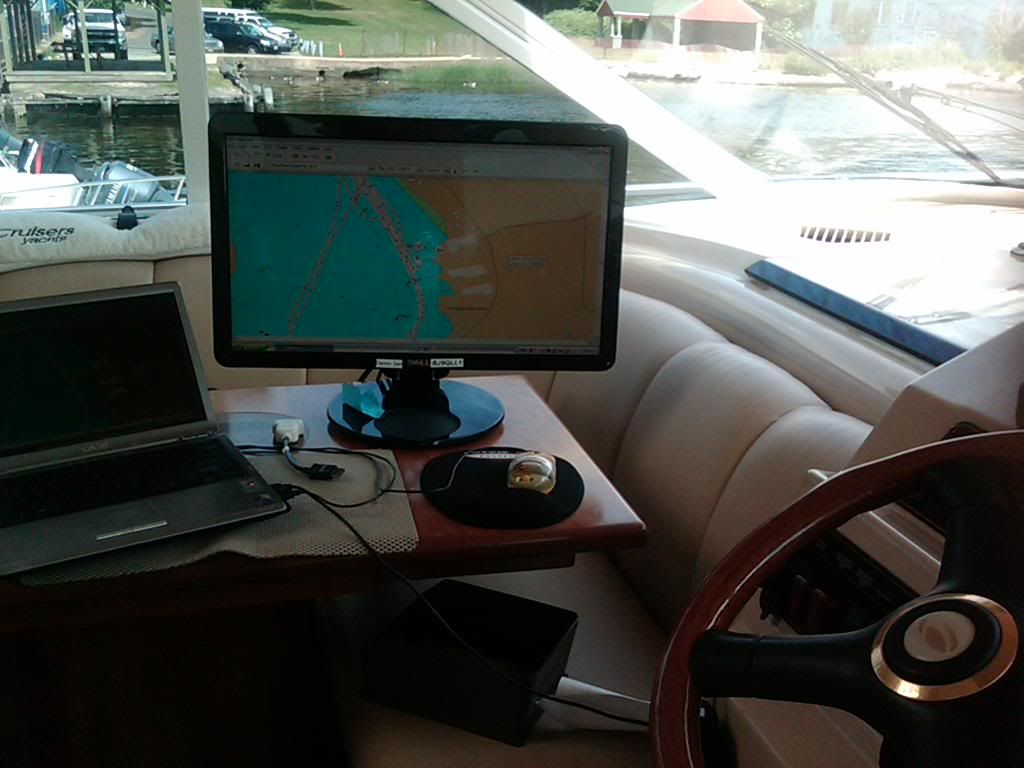
I’ve been using the Garmin/bluechart/NRoute system for years at the lower helm. Like it a lot. Moved to a 24" screen this year to help out the eyes
IMG00019-20100630-1505.jpg


However Garmin stopped making it available as a real time plotter and you would have to download the NRoute from 3rd party sites.

I can’t tell how impressed I am with the Navionics software for the DroidX it refreshes faster that my Northstars- I think it uses data from Cell & WiFi for enhancement of the Sat data.

I will be replacing my bridge units soon and will use a Garmin product(s)
 
OpenCPN and the GlobalSat BU-353 USB puck antenna have worked great for me, and the software is free. I have an express cruiser, so I don't use it while running due to the laptop's useless screen in daylight. I have a dedicated JRC 1800C GPS and RADAR, but use the laptop to get the latest free NOAA charts and plot trips, familiarize myself with new areas and just virtually play around various areas in the Great Lakes.

I've had the BU-353 for over 6 years and use it often, not just on the boat, but in the car. It works great with Google Earth Pro, Streets and Trips, Fugawi, Maptech, etc. HIGHLY recommended.

I plan on buying one of those little netbooks, possibly with a solid state hard drive and dedicate that setup to travel and boating; loading only mapping and navigation software. It'll be cheaper than buying a high end dedicated GPS (IMHO).

Let us know what you decide to go with.
 
I use my laptop and a GPS puck laying on the dash. I find it to work really well and nice to have the laptops versatility with it. I can split the screen to have tides...weather...etc. I use TikiNavigator as my software and found it to be a VERY functional bit of software. From planning (at home) to log books after the trip.....anchor watch....wind, radar and AIS overlay...autopilot capable...depth warning...anchor watch and so on. It has been developed by a retire Norwegian naval officer who really knew what he was doing and loves to keep in contact with the people that use his software. The user interface is VERY easy and intuitive also. Here is a link for more info on it:

http://www.tiki-navigator.com/

With out the cost of the laptop, which I had already, here is what it cost me to setup.

GPS puck - $59.00
TikiNavigator - $149.00
Canadian Charts - $150.00 (yes, up here we have to buy the charts...not like you lucky people south of the line!)

So, for $358 I was ready to rock and roll. And it has performed very well for me, with nothing that I can come up with to improve it. Have a good one y'all!
 
Well I must not be doing something right. I got the soundings to show up on the TN River chart, and even the mile markets, but really...no depth data at all and way less data than I can get on paper from the corps of engineers (paper charts I already have). NOAA doesn't have the river charts though- I downloaded mine from here:
http://www.agc.army.mil/echarts/inlandnav/

Any other TN River folks have a good way to get the Corps charts to display as a GPS track on my laptop? Maybe I should try seaclear but I imagine they download the charts from same location/file????
 
Well all, JUST in case someone else is trying to do this.....I ended up going with MacENC as the GPS program. I can't imagine I'm the first to go through trying to figure out how to get the best/highest level of detail for the TN River but I learned a thing or two over the last couple of days researching it. The Corps of Engineers charts are pretty darn limited in their data. Here is a jpeg of one of the pages from their charts:
http://www.lrn.usace.army.mil/opn/tnriver/charts/69.jpg
That is the same chart that is in my screenshot above that i got from OpenCpn. I got the same level of detail initially via the demo version of MacENC so I was not happy. It's not the program's fault though as Pascal posed above- it's an issue with the base charts. In emailing with the folks at MacENC it came to my attention that, apparently, the only charts available with any high level of data are from Navionics which are compatible with MacENC. So- the free options off the web just didn't work for the TN River if you want the best charts. I had to go with MacENC and the Navionics charts. I also got the GlobalSat BU-353 GPS puck. All said and done, for all the above, right at about $350. So not free but way less money than what a dedicated plotter with 10" screen would cost me and I can wire a monitor up to the bridge like The Other Gary did and I am sure others have done.
Here is a screenshot of same section of chart via the Navionics chart (MUCH better):
NavionicsChart.png

If we get down to the coast (I mean when!!) i'll be able to snag the free NOAA charts and use them with MacENC so all in all, not bad.
Now I just need to learn how to use it. :)
Running off a mac platform instead of the windows makes me much more comfortable about not having things crash. I still will carry the paper charts on the boat but it's not like we are running in 5-8' seas on the river!
 
Woodsong Does one need a GPS receiver or just
the hockey puck, laptop and charts? I have Fugawi and charts loaded on my laptop
 
I must be missing something. Because to me the NOAA chart seems to have all the detail you'd need plus way more land based details.

And besides, your navigating on a river, the channels can change often and you can only go up or down. :-)
 
Ocean, no GPS receiver needed. The BU-353 GPS Puck basically plugs into your USB port and turns your laptop into a "GPS Receiver." Combine it with a chart program such as seaclarII, OpenCpn, or MacENC, or Fugawi and you've got the charts and the GPS to create a very cheap chartplotter.

Bill- the TN and other inland river charts are not NOAA charts but Corps of Engineer charts. If you have a site that has the detail of NOAA coastal charts but for the TN RIver please do let me know where to find them. I searched and searched and searched and they do not exist as far as I can tell. No doubt you are correct though for coastal waters- the NOAA charts are the way to go and no need for other charts but try and get them for the TN River and they don't exist. However, I'd love to be proven wrong!!! :)
 
Gary,
Not sure if you mentioned it here or on another thread, but you said somewhere or another you were pondering getting a wireless mouse for your bridge station. I haven't tested it on the boat yet but today I bought a wireless mouse for about $15 from the local big box office supply store- it's a Logitech M305 so that I can run with laptop down rb2@gr5t lower helm, hardwire another screen to bridge and hopefully wireless mouse on the bridge. Just testing it here at the house....it worked from 2 rooms away (through 2 walls, one a plumbing wall, and about 35 feet away) which completely surprised me. I'll know this weekend or sooner when I go up to the boat but can't imagine it won't work to control the mouse from the flybridge with laptop directly below at lower helm. I'll confirm once on the boat but figured you might like to go wireless though since you've already run the wires it may be a mute point. For me though, if it works, all I have to do is run a monitor cable to the bridge to have dual station GPS capacity.

Now to get a flatscreen for the bridge.....
 
Back
Top